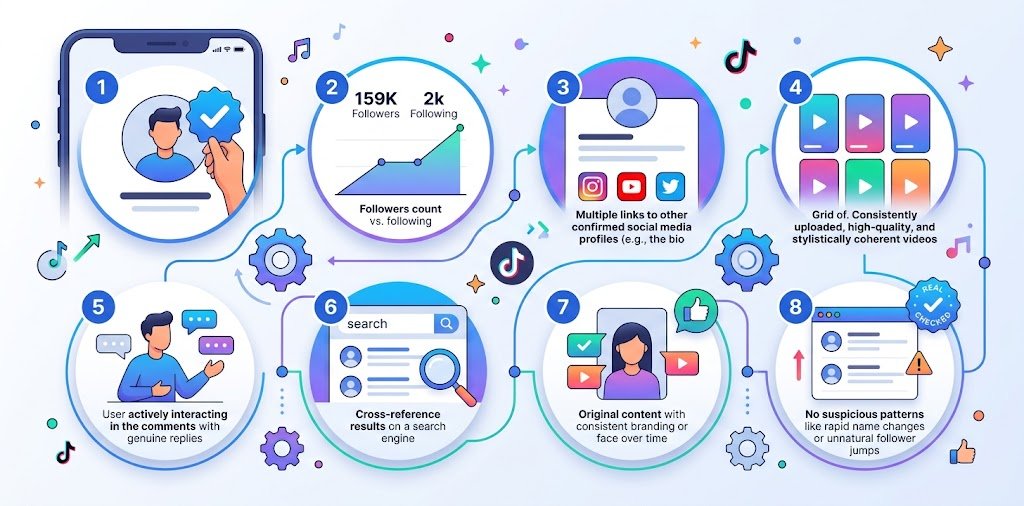
How to Verify a TikTok Account Is Real: 8 Checks That Actually Work
Fake TikTok accounts aren’t rare. Between bot-driven engagement farms, catfish profiles built to scam or manipulate, and impersonators posing as real creators or brands, it’s become genuinely useful to know how to verify a TikTok account before you follow, trust, or engage with one. This is especially true for brands vetting influencer partnerships, and for anyone who’s been approached by a stranger claiming to be someone they’re not.
Here are eight practical checks, in the order most people should run them.
Key Takeaways
- Knowing how to verify a TikTok account matters most before brand deals, personal connections, or trusting content shared as “official.”
- The blue checkmark isn’t the only signal plenty of real accounts are unverified, and some fake ones mimic verified branding.
- A combination of account age, posting consistency, engagement ratio, and cross-platform presence gives a far more reliable picture than any single check.
- Reverse-checking a profile picture can flag stolen photos, but it isn’t foolproof and should be paired with other checks.
- A tiktok account checker approach cross-referencing username, bio links, and posting history catches most catfish and bot accounts before you engage.
- If you already know the account’s username or handle, tools like our TikTok Profile Finder can help confirm the account’s history and consistency at a glance.
Why Account Verification Matters More Than People Think
Impersonation and catfishing on social platforms aren’t just a personal-safety issue — they’re a business one too. Brands that don’t verify an influencer’s account before a partnership risk paying for bot-inflated engagement. Individuals who don’t check who they’re really talking to risk far more personal consequences, from scams to emotional manipulation. A few minutes of checking up front avoids most of these outcomes.
Check 1: Look Past the Blue Checkmark
TikTok’s verification badge only applies to a small subset of notable public figures, brands, and creators. Most real, legitimate accounts including small businesses and everyday users — will never be verified, so the absence of a checkmark isn’t a red flag on its own. Conversely, scammers sometimes edit a screenshot or use a lookalike profile photo to imply verification. Always check the badge directly in the app rather than trusting a shared screenshot.
Check 2: Review Account Age and Posting History
A tiktok account tracker mindset starts here: scroll to the earliest posts on the profile. Accounts created recently, with a burst of content uploaded all at once, are more likely to be fake, farmed, or freshly created for a scam. Genuine long-term creators typically show a posting history that develops gradually evolving content style, inconsistent early engagement, and gaps that reflect a real, ongoing presence rather than a manufactured one.
Check 3: Examine the Follower-to-Engagement Ratio
This is one of the most reliable signals. Compare follower count to average likes, comments, and views per video:
- A real, engaged account usually shows engagement in the range of roughly 3–9% of its follower count per video (this varies by niche).
- An account with 500K followers but videos averaging a few hundred views is a strong indicator of purchased followers or bot activity.
- Watch the comments themselves, not just the count generic, repetitive comments (“Nice!” “Great content!”) from accounts with no profile picture are a bot-farm pattern.
Check 4: Cross-Reference With Other Platforms
Real creators and brands almost always have a presence beyond TikTok. Search the same username or display name on Instagram, YouTube, and Twitter/X. If the account claims to be a known public figure or established brand but has no matching presence anywhere else, treat that as a serious warning sign. This kind of tiktok account information finder approach checking whether an identity is consistent across platforms is one of the fastest ways to catch impersonators.
Check 5: Reverse-Search the Profile Picture
Right-click (or long-press on mobile) the profile picture and run it through a general reverse image search tool. This can reveal whether the photo has been lifted from a stock image site, a different person’s social account, or another platform entirely a common pattern in catfish and romance-scam accounts. Keep in mind this check has limits: it flags stolen photos but won’t confirm identity on its own, since a real person could also simply have no other online footprint for that photo.
Check 6: Check the Bio and Link-in-Bio Destination
Scammers and fake accounts frequently include external links to sketchy giveaway sites, phishing pages, or unrelated e-commerce stores. Before clicking, hover to preview the URL where possible, and be cautious of shortened links (bit.ly, etc.) with no context. A legitimate brand or creator’s bio link typically leads to an official website, a consistent link-in-bio page, or a verified social hub.
Check 7: Look for Consistency in Niche and Voice
Fake accounts, especially bot-run or hijacked ones, often show inconsistent content — a sudden pivot from cooking videos to unrelated promotional content, or a noticeable shift in writing style, tone, or posting frequency. This kind of inconsistency is one of the more overlooked ways how to verify a TikTok account checks succeed where a surface-level glance fails.
Check 8: Use a Lookup Tool to Confirm Username History
If you know (or think you know) the account’s username, a dedicated tiktok account checker style tool can help confirm whether the handle has a consistent history or has changed recently a pattern sometimes associated with hijacked or repurposed accounts. Our TikTok Profile Finder is built for this kind of username-based verification, helping confirm you’re looking at the account you think you are before you trust it.
Comparison: Manual Checks vs. Tool-Assisted Verification
| Manual Checks | Tool-Assisted Verification | |
|---|---|---|
| Speed | Slower, requires checking multiple signals yourself | Faster for username/handle confirmation |
| Depth | Good for engagement and content-consistency review | Good for confirming account history and handle consistency |
| Best for | Spotting bot engagement, inconsistent content, fake bios | Confirming you have the correct, consistent account |
| Limitation | Time-consuming across many checks | Doesn’t replace judgment on engagement quality or content style |
Pros and Cons of Relying on the Verification Badge Alone
| Pros | Cons |
|---|---|
| Quick, one-glance signal for major public figures and brands | Excludes the vast majority of legitimate small creators and businesses |
| Reduces risk of impersonation for verified public accounts | Can be visually mimicked in screenshots or edited images |
| No extra steps required | Doesn’t confirm engagement authenticity or account history |
Red Flags That Suggest a Fake or Catfish Account
- Profile picture doesn’t match any other online presence
- Bio pushes urgency (“DM me now,” “link expires soon”)
- Very high follower count paired with very low engagement
- Recently created account claiming to be an established figure
- Comments dominated by generic bot-style replies
- Requests to move the conversation off-platform immediately
Frequently Asked Questions
Does a verified checkmark guarantee an account is real?
It significantly reduces risk since TikTok reviews verification requests, but it isn’t an absolute guarantee, and unverified accounts can still be completely legitimate.
What’s the fastest single check for spotting a fake account?
The follower-to-engagement ratio is usually the quickest red flag a large following with unusually low views or likes per video is one of the most consistent signals of bot or purchased followers.
Can I verify a TikTok account without downloading the app?
Yes, most checks reverse image search, cross-platform comparison, bio link review can be done through TikTok’s web version or a username-based lookup tool without needing the app installed.
How do I know if a brand account on TikTok is official?
Cross-check the account against the brand’s official website (most legitimate brands link their social accounts in the site footer) and compare against their verified presence on other platforms.
Are catfish accounts always trying to scam money?
Not always — some catfish accounts are built for social manipulation, harassment, or simply misrepresenting identity without a direct financial motive, so financial requests aren’t the only warning sign to watch for.
Conclusion
Verifying a TikTok account doesn’t require special tools or technical expertise it mostly comes down to checking multiple signals together rather than trusting any single one. Account age, engagement ratio, cross-platform consistency, and bio behavior will catch the vast majority of fake, bot, or catfish accounts before they cause a problem. When you already have a username to confirm, a lookup tool like our TikTok Profile Finder adds a fast, reliable final check before you follow, message, or partner with an account.